

ตอนที่ 6 การใส่ Transition ในโปรแกรม Camtasia Studio 9
การใส่ Transition ในโปรแกรม Camtasia Studio 9 นั้น เครื่องมือ Transition จะใช้สำหรับการเปลี่ยนฉาก หรือคลิปของช่วงต่อของคลิป สามารถเลือกใช้ได้ตามต้องการ โดยมีวิธีการใช้งานดังต่อไปนี้
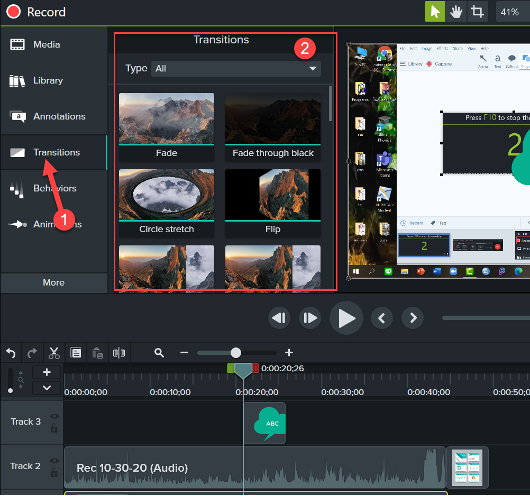
1. เลือกเมนู Transition จะปรากฏหน้าต่าง Transition หลายๆ แบบ ดังภาพ
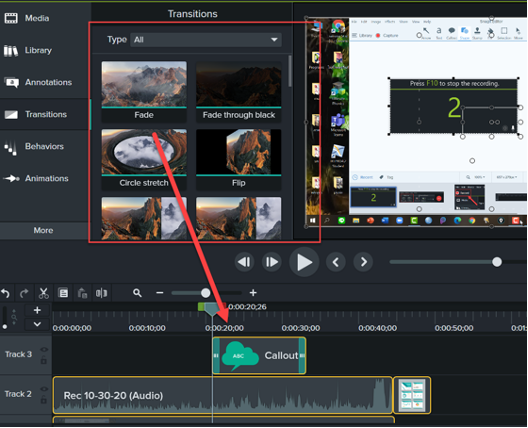
2. เลือก Transition ที่ต้องการ แล้วลากไปวางใน Timeline ระหว่างช่วงต่อของคลิปวิดีโอ
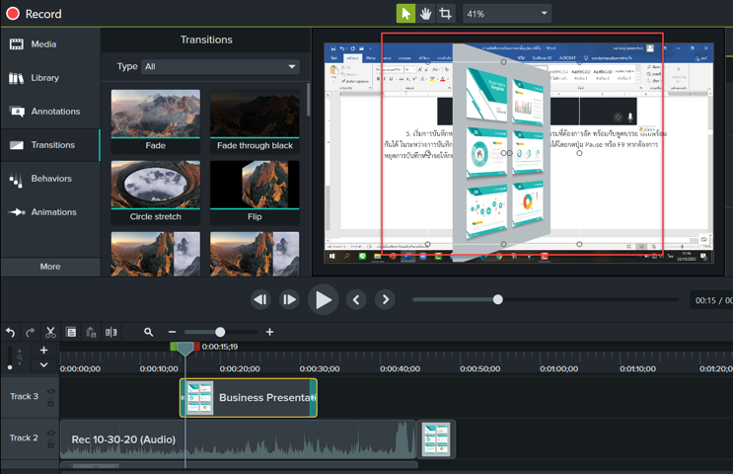
3. เมื่อลาก Transition มาวาง สามารถดู Preview โดยการกดปุ่ม Spacebar
ดร.อนุศร หงษ์ขุนทด
musicmankob@gmail.com
https://line.me/ti/p/erOAZ63qtW